Browse
Instead of clicking through checkout by hand
An AI model follows a goal in plain words, or replays fixed steps with no model at all.
--journey purchase

An AI model clicks through your site like a visitor. Rules check every GA4, Google Ads, Meta and TikTok hit against your measurement plan and Consent Mode. Run it in your terminal, in CI after each deploy, or from your AI assistant.
$ npm install -g @analitikisler/ai-tag-debugger
$ npx -y @analitikisler/ai-tag-debugger run --site https://staging.yourshop.com --journey add_to_cart
"ai-tag-debugger": { "command": "npx", "args": ["-y", "@analitikisler/ai-tag-debugger", "mcp"] }
Checks the tags you already run
Pick any of them with --providers.
One real run
We built a demo shop with known tracking bugs and ran two journeys on desktop and mobile. This run used rules only, with no AI model, so anyone can repeat it for free.
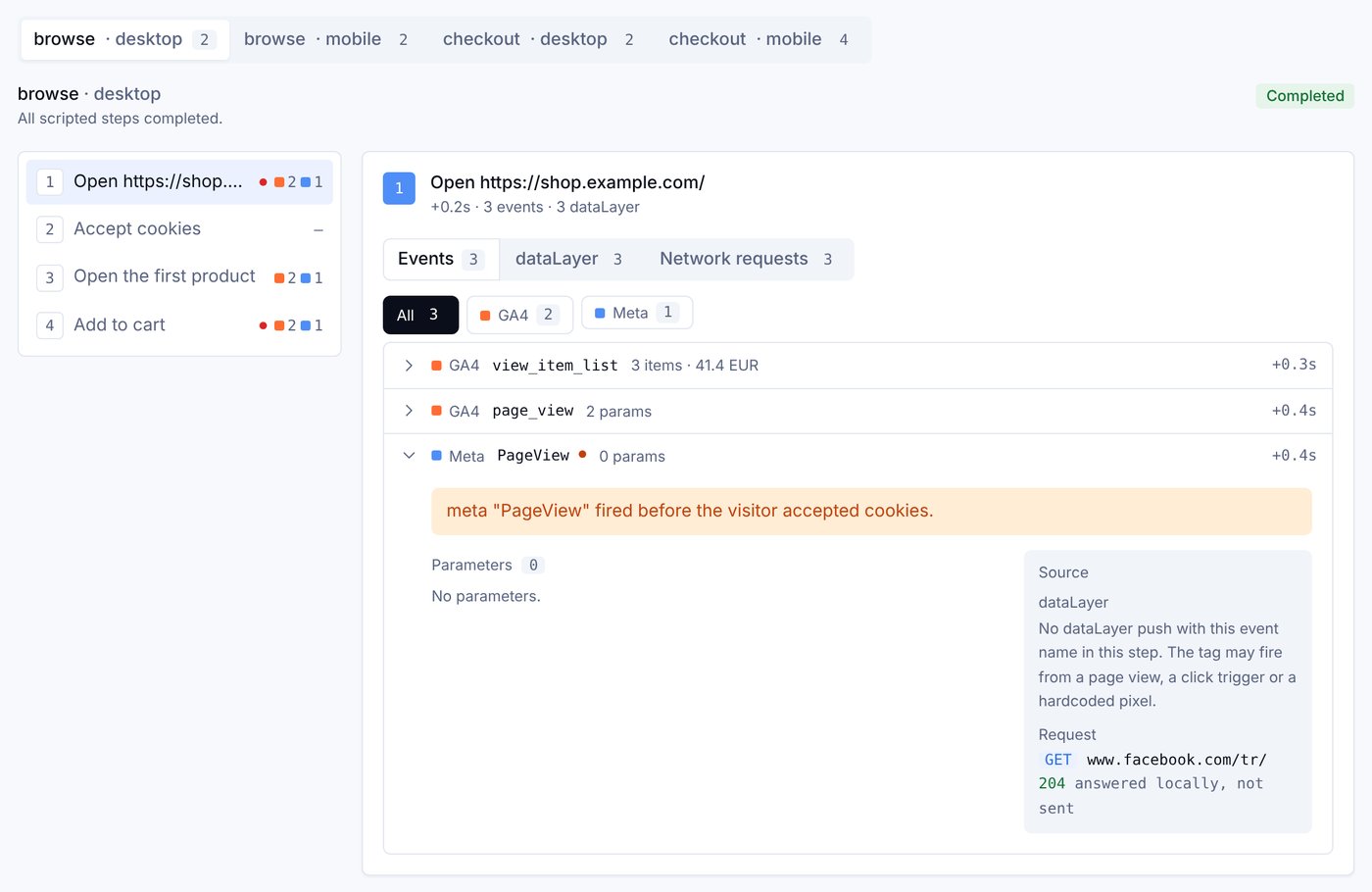
$ ai-tag-debugger run --config examples/demo.config.json --scripted --no-ai ▶ checkout (mobile) Accept cookies Open the first product Add to cart Open the cart Go to checkout … Place the order ✓ All scripted steps completed. · 20 tracking hits captured ✗ broken GA4 purchase sent without currency, value (mobile)✗ broken Meta Purchase sent without value, currency (mobile)! risk Meta PageView fired before the visitor accepted cookies! warning add_to_cart sent 2 times by one action 2 broken · 1 risk · 1 warning · 4 okReport: reports/demo/report.html
purchase sent to GA4 and Meta without value and currency on mobilePageView sent to Meta before the visitor accepted cookiesadd_to_cart sent twice by one clickHow it works
Instead of clicking through checkout by hand
An AI model follows a goal in plain words, or replays fixed steps with no model at all.
--journey purchaseInstead of the Network tab
Every hit and dataLayer push, tagged with the step that caused it. Test hits are answered locally, so your real accounts stay clean.
--providers ga4,meta,tiktokInstead of a spreadsheet of expected events
Rules compare hits with your measurement plan: missing events and parameters, duplicates, consent and personal data.
--events purchase,add_to_cartInstead of writing the ticket yourself
The model writes the likely cause and the fix for each problem, in English or Turkish.
--lang trQuickstart
$ npm install -g @analitikisler/ai-tag-debugger
$ npx -y playwright@1.56.1 install chromium
The tool runs on Node 20 or newer. Playwright drives a real Chromium browser.
The report
One HTML file with four tabs: Overview, Findings, Journeys, and Scope and plan. Send it to a developer or a client. It needs no server and runs no scripts.
report.htmlSummary, findings with cause and fix, full timelinetimeline.csvOne row per hit, for Excel or Google Sheetsreport.mdFor a pull request commentcapture.jsonEverything captured, for your own analysis[redacted]Emails, phones and user ids are masked before they're storedAI assistants
AI Tag Debugger is also an MCP server, so it works with Claude, ChatGPT, Gemini and other assistants that support MCP. The assistant's own model drives the browser and explains the findings in the chat.
{
  "mcpServers": {
    "ai-tag-debugger": {
      "command": "npx",
      "args": ["-y", "@analitikisler/ai-tag-debugger", "mcp"]
    }
  }
}{
"mcpServers": {
"ai-tag-debugger": {
"command": "npx",
"args": ["-y", "@analitikisler/ai-tag-debugger", "mcp"]
}
}
}# Add it as an MCP server that runs this command npx -y @analitikisler/ai-tag-debugger mcp # Install the browser once npx -y playwright@1.56.1 install chromium
# 1. Expose a local port
cloudflared tunnel --url http://localhost:8787

# 2. Start the server in HTTP mode
npx -y @analitikisler/ai-tag-debugger mcp --http --port 8787 \
  --public-url https://<your-tunnel-address>

# 3. Add the printed /mcp/<secret> URL as a connector
export ANTHROPIC_API_KEY=...   # or OPENAI_API_KEY, GEMINI_API_KEY

ai-tag-debugger run --site https://staging.yourshop.com \
  --journey purchase --viewport mobile

# Mistral, DeepSeek, Groq, OpenRouter, a local Ollama...
ai-tag-debugger run --provider openai-compatible \
  --base-url http://localhost:11434/v1 --model qwen3 ...
Analitik İşler Cloud
AI Tag Debugger stays free and open source. Analitik İşler Cloud is our hosted service on top of it, with history, alerts and many sites in one place.
| AI Tag DebuggerOpen source · Free | Analitik İşler CloudHosted · Contact us | |
|---|---|---|
| Testing | ||
| AI and rules-only runs | ✓ | ✓ |
| Measurement plan and consent checks | ✓ | ✓ |
| Report in English or Turkish | ✓ | ✓ |
| Running it | ||
| After each deploy | Your CI (GitHub Actions example) | ✓ Deploy webhooks |
| On a schedule | — | ✓ |
| From ChatGPT or Gemini | Your own tunnel | ✓ Hosted MCP URL |
| Teams and agencies | ||
| Run history and alerts | — | ✓ |
| Many client sites in one place | — | ✓ |
| Consent Check and Measurement Plan drafts | — | In development |
$ npx -y @analitikisler/ai-tag-debugger run --site https://staging.yourshop.com --journey purchase